How to Install and Uninstall Silverlight

See Also

Silverlight plug-in Inplace and Indirect installation, How to
Silverlight Development Tools & Software
Silverlight Interview Questions
Silverlight prerequisites and installation for web application development
Silverlight Examples and Samples Download
How to use gradient color brush in Silverlight

How to Install Silverlight

Here are the steps to Install silverlight

1. Open http://silverlight.net/Default.aspx

2. Open GET STARTED Page by clicking it.

3. Find out Download Silverlight Link (If already Silverlight is installed in your machine this link will not be appeared to you).

4 If you click on Download Silverlight Link, It opens Microsoft Silverlight Install Page http://www.microsoft.com/silverlight/install.aspx.

5. Click on Install Now Option then you can download the Silverlight Plug-in.

5. Then Install Silverlight By using downloaded silverlight plug-in installable setup software.

6. While Installing Silverlight you can see the progress screen as bellow.

7. Restart all of your browsers

This silverlight installation can work for all the browsers like Internet Explorer, Mozilla, Opera.....

How to uninstall Silverlight

Bellow are the steps to follow to uninstall the silverlight

1. Go to Start menu.

2. Go to Control Panel

3. Open Add or Remove programs.

4. Choose Microsoft Silverlight in Add Remove Programs Dialog box.

5. Click on Remove

6. It asks you for the confirmation.

7. Click YES to Uninstall the Silverlight

You can see the Uninstalling silverlight in bellow image.


Hope this post is useful.

See Also

Silverlight plug-in Inplace and Indirect installation, How to
Silverlight Development Tools & Software
Silverlight Interview Questions
Silverlight prerequisites and installation for web application development
Silverlight Examples and Samples Download
How to use gradient color brush in Silverlight
Read the full article!!!

Silverlight Examples and Samples Download

Download and view the following Silverlight Program samples.
To view the following sample you need to install silverlight browser plugin in your machine. Please go through following three articles
1. Silverlight Development Tools & Software,
2. Silverlight prerequisites and installation for web application  development,
3. Silverlight plug-in Inplace and Indirect installation, How to

Silvelight Examples / Samples - View and Download source code

2D Physics Simulation
Grand Piano
Silverlight Mind Map

3D Teapot Demo
Infragistics Controls Demo
Silverlight Pad

Amazon Search Visualization
JavaScript / .NET Chess
Silverlight Playground

AOL Social Mail Gadget
Laugh-o-Sphere
Silverlight Rocks

Binary Clock
LiveStation
SilverNibbles

Browser Poker
Matrix Digital Rain
Smalltalk on Silverlight

Bubble Factory
Michael's Journal
Sprawl

Bubblemark
Office Ribbon
Surface Prototype

Comic Book Viewer
Photopoints Gallery
SVG to Silverlight Converter

Destroy All Invaders
Popfly
Telerik RadControls 3D Cube

Digger
Python Console
Verlet Integration Algorithm

Disco Dance Floor
Reflecting Graph
Windows Journal-to-Silverlight Converter

Dr Greenthumb
Reflector for Silverlight
Windows Vista Simulator

Dr Popper
Roxio Buzz
XamlWebPad

GlyphMap
Sierpinski Triangle
XPS Viewer

GOA WinForms Demo
Silverlight Airlines Demo
Zero Gravity

Gradient Animations
Silverlight Chess Game Replay

Read the full article!!!

How to use gradient color brush in Silverlight

See Also: 1. Hello World Silverlight Example with <TextBlock> Tag
                     2How to display text with solid color brush
                     3. How to use gradient color brush in Silverlight
Download Source Code - How to use gradient brush in silverlight

If you don't have silverilght installed in your system first go through these articles otherwise please simply skip bellow articles

Silverlight prerequisites and installation for web application development

Silverlight Development Tools & Software
Silverlight plug-in Inplace and Indirect installation, How to
Hello World Silverlight Example with <TextBlock> Tag

Step 1. Open Visual Studio,

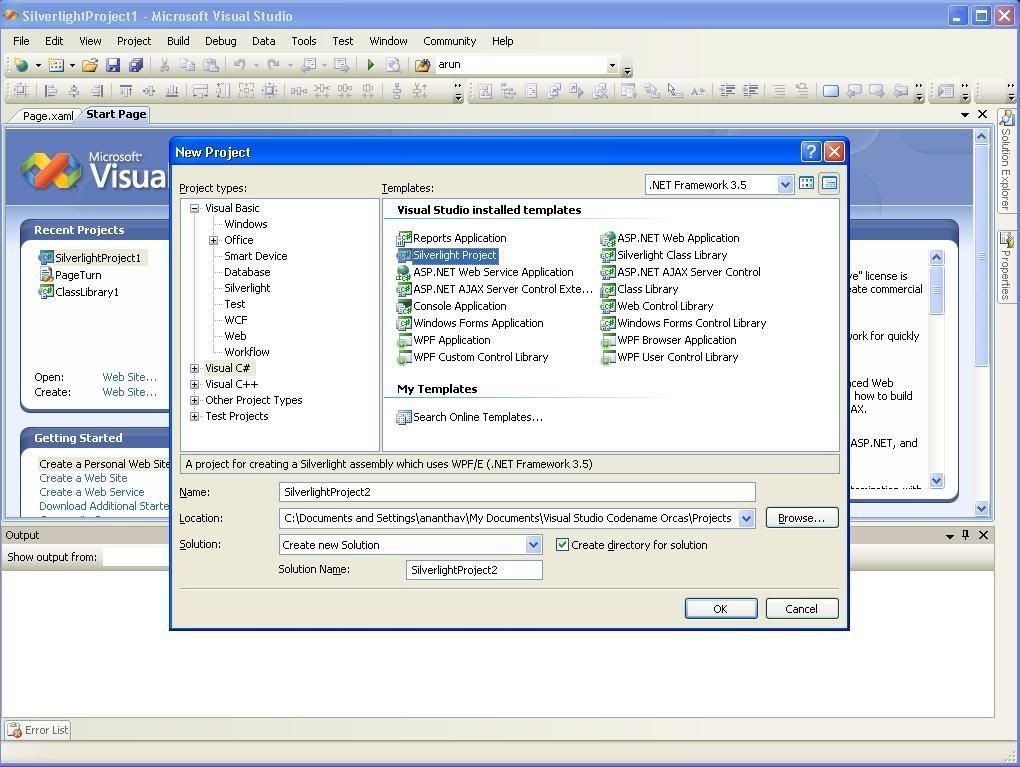
Step 2. Open New Silverlight Project

Now By Default you will get Page.xaml with the following code

<Canvas x:Name="parentCanvas"
xmlns="http://schemas.microsoft.com/client/2007"

xmlns:x="http://schemas.microsoft.com/winfx/2006/xaml"

Loaded="Page_Loaded"

x:Class="SilverlightProject1.Page;assembly=
ClientBin/SilverlightProject1.dll
"
Width="640"
Height="480"
Background="White"
>

</
Canvas>

Step 3. To display a text message in silveright canvas we have tag called <TextBlock>


Find the following modified code after adding <TextBlock> tag with Foreground attribute (Solid Brush)

<Canvas
xmlns="http://schemas.microsoft.com/client/2007"

xmlns:x="http://schemas.microsoft.com/winfx/2006/xaml"

x:Name="parentCanvas"

Loaded="Page_Loaded"

x:Class="SilverlightProject1.Page;assembly=ClientBin/SilverlightProject1.dll"
Width="885"
Height="500"

Background="White"
>
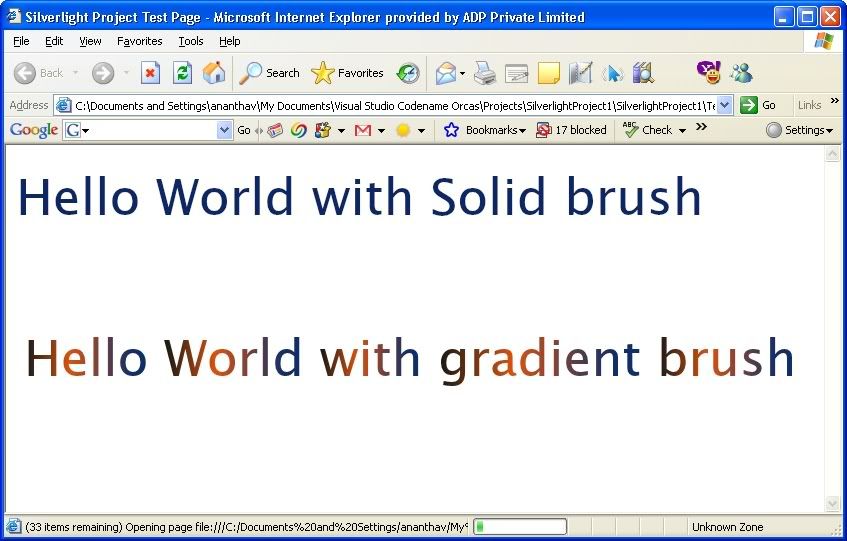
  <TextBlock Text="Hello World with Solid brush" FontSize="50" Foreground="#FF0D2764"/>
<
TextBlock Text="Hello World with gradient brush" FontSize="50" Canvas.Left="8" Canvas.Top="161.368">
<
TextBlock.Foreground>
<
LinearGradientBrush EndPoint="1,0.5" StartPoint="0,0.5">
<
GradientStop Color="#FF141714" Offset="0"/>
<
GradientStop Color="#FFDD520E" Offset="0.37"/>
<
GradientStop Color="#FF0F2E6A" Offset="0.861"/>
</
LinearGradientBrush>
</
TextBlock.Foreground>
</
TextBlock>
</Canvas>

Step 4. Now Run the Application By Pressing F5 with debugging or Ctrl+F5 without debugging.


Download Source Code - How to use gradient brush in silverlight

See Also: 1. Hello World Silverlight Example with <TextBlock> Tag
                     2How to display text with solid color brush
                     3. How to use gradient color brush in Silverlight
Read the full article!!!

How to display text with solid color brush

See Also: 1. Hello World Silverlight Example with <TextBlock> Tag
                   2How to display text with solid color brush
                   3. How to use gradient color brush in Silverlight
Download Source Code - How to use solid brush in silverlight

If you don't have silverilght installed in your system first go through these articles otherwise please simply skip bellow articles

Silverlight prerequisites and installation for web application development

Silverlight Development Tools & Software
Silverlight plug-in Inplace and Indirect installation, How to
Hello World Silverlight Example with <TextBlock> Tag

Step 1. Open Visual Studio,

Step 2. Open New Silverlight Project

Now By Default you will get Page.xaml with the following code

<Canvas x:Name="parentCanvas"
xmlns="http://schemas.microsoft.com/client/2007"

xmlns:x="http://schemas.microsoft.com/winfx/2006/xaml"

Loaded="Page_Loaded"

x:Class="SilverlightProject1.Page;assembly=
ClientBin/SilverlightProject1.dll
"
Width="640"
Height="480"
Background="White"
>

</
Canvas>

Step 3. To display a text message in silveright canvas we have tag called <TextBlock>


Find the following modified code after adding <TextBlock> tag with Foreground attribute (Solid Brush)

<Canvas
xmlns="http://schemas.microsoft.com/client/2007"

xmlns:x="http://schemas.microsoft.com/winfx/2006/xaml"

x:Name="parentCanvas"

Loaded="Page_Loaded"

x:Class="SilverlightProject1.Page;assembly=ClientBin/SilverlightProject1.dll"
Width="885"
Height="500"

Background="White"
>
<
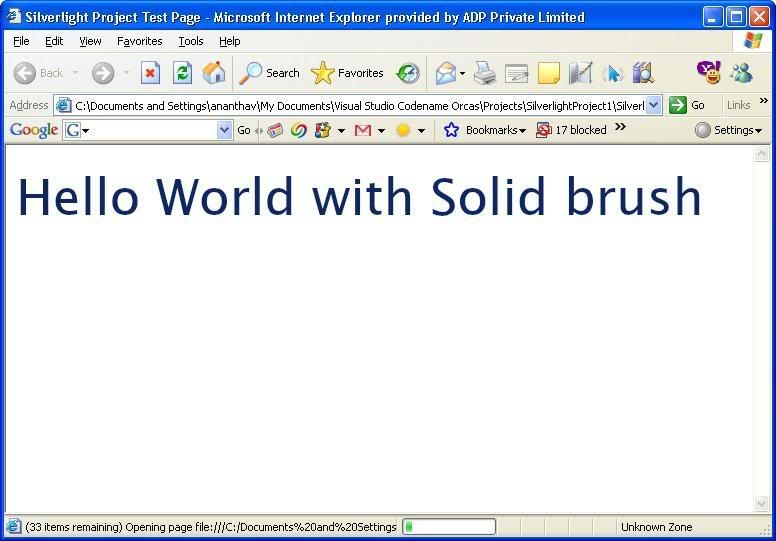
TextBlock Text="Hello World with Solid brush" FontSize="50" Foreground="#FF0D2764"
/>

</
Canvas>
 

Step 4. Now Run the Application By Pressing F5 with debugging or Ctrl+F5 without debugging.


Download Source Code - How to use solid brush in silverlight

See Also: 1. Hello World Silverlight Example with <TextBlock> Tag
                   2How to display text with solid color brush
                   3. How to use gradient color brush in Silverlight
Read the full article!!!

Hello World Silverlight Example with <TextBlock> Tag

See Also: 1. Hello World Silverlight Example with <TextBlock> Tag
                   2How to display text with solid color brush
                   3. How to use gradient color brush in Silverlight

Download Source Code

If you don't have silverilght installed in your system first go through these articles otherwise please simply skip bellow three articles

Silverlight prerequisites and installation for web application development

Silverlight Development Tools & Software
Silverlight plug-in Inplace and Indirect installation, How to

Step 1. Open Visual Studio,

Step 2. Open New Silverlight Project

Now By Default you will get Page.xaml with the following code

<Canvas x:Name="parentCanvas"
xmlns="http://schemas.microsoft.com/client/2007"

xmlns:x="http://schemas.microsoft.com/winfx/2006/xaml"

Loaded="Page_Loaded"

x:Class="SilverlightProject1.Page;assembly=
ClientBin/SilverlightProject1.dll
"
Width="640"
Height="480"
Background="White"
>

</
Canvas>

Step 3. To display a text message in silveright canvas we have tag called <TextBlock>


Find the following modified code after adding <TextBlock> tag

<Canvas x:Name="parentCanvas"
xmlns="http://schemas.microsoft.com/client/2007"

xmlns:x="http://schemas.microsoft.com/winfx/2006/xaml"

Loaded="Page_Loaded"

x:Class="SilverlightProject1.Page;assembly=
ClientBin/SilverlightProject1.dll
"
Width="640"
Height="480"
Background="White"
>
<
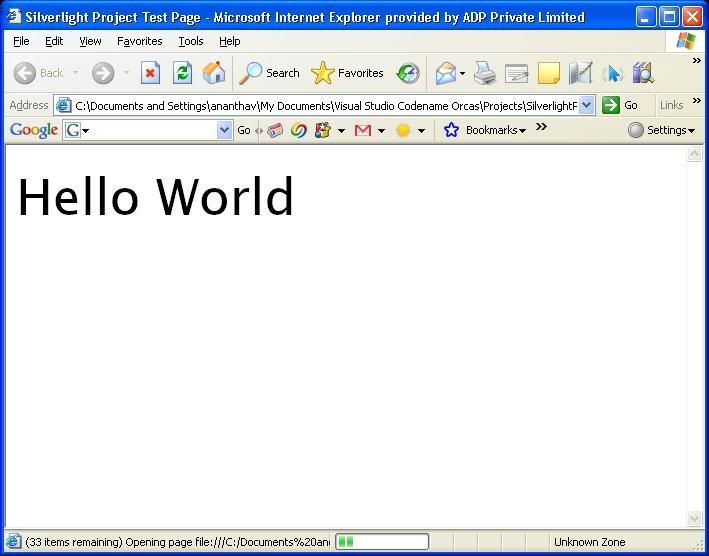
TextBlock Text="Hello World" FontSize="50"
/>
</
Canvas>

Step 4. StepNow Run the Application By Pressing F5 with debugging or Ctrl+F5 without debugging.


Download Source Code

See Also: 1. Hello World Silverlight Example with <TextBlock> Tag
                   2How to display text with solid color brush
                   3. How to use gradient color brush in Silverlight
Read the full article!!!

Expression Blend Tutorials

Today I have found very good tutorials for Expression Blend from www.movielibrary.lynda.com. These tutorials covers the topics like

Overview and Installation, The Workspace, Managing Your Projects, Drawing in Blend, Appearance, Working with Text, Using 3D, Media Integration, Layout Controls, Media Integration, Layout Controls, Transformations, Animation and Interactivity, WPF Controls, Working with Data, Application Deployment, Please find following Expression Blend tutorial pages

Expression Blend

Getting Started with Expression Blend 3.75 hours

Expression Blend Beta Preview 2.5 hours

Expression Design

Getting Started with Expression Design

Hope these tutorials are useful. Suggest the some more best tutorials on this topic in bellow comment section.

Read the full article!!!

Silverlight Internet TV platform By Maven Networks

Maven Networks, which provides hosting services for Internet TV, will announce Wednesday plans to add Microsoft's new Silverlight technology as a video delivery vehicle. The company is collaborating with Microsoft on this endeavor. Through Silverlight, Maven's customer base of professional media companies will be able to leverage familiar Windows Media technology as well as workflow automation, publishing, and player creation capabilities of the Maven Internet TV platform. Read More

Read the full article!!!

Changing Silverlight Text Direction Right to Left

In some languages text has to be displayed in right to left direction. 
For this case we don't have any property supported by XAML, Java script.
To achieve it we can use following traditional way.
Silverlight 1.1
        char[] str = mystr.Text.ToCharArray();
Array.Reverse(str);
mystr.Text = new string(str);

Silverlight 1.0


mystr.Text = mystr.Text.split('').reverse.join('');
Hope It could be useful for silverlight lovers. Please post your comments bellow.
Read the full article!!!

Silverlight Transparent Control Creation

Step1: Open page Default.aspx.js

Step2: Goto the function "createSilverlight"

Step3: set the isWindowless value to true.

Find the example bellow

function createSilverlight()
{
 Sys.Silverlight.createObjectEx({
  source: "Page.xaml",
  parentElement: document.getElementById("SilverlightControlHost"),
  id: "SilverlightControl",    
  properties: {
   width: "100%",
   height: "100%",
   version: "0.95",
   isWindowless:"true",
   background:"#00FFFFFF",

   enableHtmlAccess: true
  },
  events: {}
 });
}

Now run your application your silverlight control will be in transparent.

Hope this can be useful. Post your comments bellow.

Read the full article!!!

Silverlight Video Tutorials

To view silverlight components in web page. you need silverlight plu-in. please see process of silverlight plug-in installation Silverlight plug-in Inplace and Indirect installation, How to, to develop rich silverlight applications you need have to have essential silverlight tools. Please find the Silverlight Development Tools & Software and to learn the silverlight following video tutorials would be very useful for you.


Publishing Media Content to Silverlight Streaming Services

Real-Time Data Update with Silverlight and Web Services

Overlaying HTML and Silverlight Content

Creating a Video Playlist with Silverlight and ASP.NET

Using AJAX to Dynamically Update Silverlight Content

Delivering Parameterized Silverlight Content with Java

Delivering Parameterized Silverlight Content with PHP

Delivering Parameterized Silverlight Content with ASP.NET

Animating Vector Art for Silverlight with Expression Blend Part II

Animating Vector Art for Silverlight with Expression Blend Part I


Creating Vector Art for Silverlight with Expression Blend


MIX 2007 Silverlight Sessions

#1: DEV22 - Building Silverlight Applications Using .NET (Part 1 of 2)

#2: DEV07 - Building Silverlight Applications Using .NET (Part 2 of 2)

#3: DEV11 - Building Rich Web Experiences Using Silverlight and JavaScript for Developers

#4: DES02 - Building Rich Web Experience with Silverlight and Microsoft Expression Studio for Designers

#5: XD001 - Deep Dive on Silverlight Media Integration

#6: DEV13 - Creating and Delivering Rich Media and Video on the Web with Silverlight, Microsoft Expression Studio, and Windows Server Codename "Longhorn"

#7: DEV05 - Developing ASP.NET AJAX Controls with Silverlight

#8: XBD09 - Building Rich, Interactive E-commerce Applications Using ASP.NET and Silverlight

#9: DES01 - A View from the Front: Real World Experiences of WPF and Silverlight

#10: DEV10 - Extending the Browser Programming Model with Silverlight

#11: DEV02 - Just Glue It! Ruby and the DLR in Silverlight


Silverlight 1.0 Tutorials

#1: Overlaying HTML and Silverlight Content

#2: Basic Keyboard Input with Silverlight

#3: Building Video Overlays with Silverlight

#4: Real-Time Data Update with Silverlight and Web Services

#5: Using AJAX to Dynamically Update Silverlight Content

#6: Animating and Clipping Video with Silverlight

#7: Using Silverlight Brushes for Color, Gradient and Video

#8: 2D Geometries in Silverlight

#9: Using Silverlight for Full Screen Experiences

#10: Creating a Video Scrubbing Control with Silverlight

#11: Silverlight Event Handling with JavaScript

#12: Using Input Method Editors for Text Entry in Silverlight

#13: Adding Ink Support to a Silverlight-based Application

#14: Delivering Parameterized Silverlight Content with ASP.NET

#15: Delivering Parameterized Silverlight Content with PHP

#16: Delivering Parameterized Silverlight Content with Java


Silverlight 1.1 Tutorials

#1: Getting Started with Silverlight 1.1

#2: Top Banana

#3: Dynamic Languages with Silverlight

#4: Silverlight in Their Own Words


Expression Blend with Silverlight 1.0 Tutorials

#1: Creating Vector Art for Silverlight with Expression Blend

#2: Animating Vector Art for Silverlight with Expression Blend Part I

#3: Animating Vector Art for Silverlight with Expression Blend Part II

#4: Animating Raster Art for Silverlight with Expression Blend

#5: Using Expression Blend to Control Silverlight Media Playback

 
Read the full article!!!

Silverlight Development Tools & Software

See Also  Silverlight prerequisites and installation for web application development


Here I published the information about all the essential tools to develop silverlight web-application. Microsoft silverlight lover should know all about these tools.

All the tools needed for silverlight web-based application development are given bellow.


Microsoft Silverlight 1.0 Beta Software Development Kit (SDK)

Download this SDK to create Silverlight Web experiences that target Silverlight 1.0 Beta. The SDK contains documentation, samples along with templates for Microsoft Visual Studio, and has also a go-live license that enables building commercial applications.

Microsoft Silverlight 1.1 Alpha Software Development Kit (SDK)

Download this SDK to create Silverlight Web experiences that target Silverlight 1.1 Alpha. The SDK contains documentation and samples.

Visual Studio 2005 Service Pack 1 (Free evaluation is available for download)

Extend the integration and productivity benefits of Visual Studio for developers to the entire software development team. Visual Studio and Microsoft Expression Studio share the same project and file formats, enabling developers and designers to collaborate freely while maintaining creative control. For the professional version, explore the Microsoft Visual Web Developer Express Edition.

Visual Studio Code Name “Orcas” Beta 1

Experience the next generation of Visual Studio. If you want to develop Silverlight applications targeting Silverlight 1.1 Alpha, this is required.

Microsoft Silverlight Tools Alpha for Visual Studio Code Name “Orcas” Beta 1

Update Visual Studio “Orcas” with the JavaScript and managed code functionality needed to develop Silverlight applications.


Microsoft ASP.NET Futures (May 2007)

Compatible with both Visual Studio 2005 and Visual Studio “Orcas,” this package contains ASP.NET-based Silverlight controls.

Internet Explorer Developer Toolbar Beta 3

Quickly create, understand, and troubleshoot Web pages with these tools—for free. This version is a preview release and behavior may change in the final release.


Microsoft Expression Studio (Free evaluation is available for download)

Whether creating standards-based Web user interfaces by using Microsoft ASP.NET, building cross-platform rich interactive applications with Silverlight, or creating ultimate Windows Vista experiences with Windows Presentation Foundation (WPF), Expression tools enable designers to fully apply their creativity while collaborating with developers using Visual Studio. Expression Studio includes the following products:

Windows Movie Maker

Import audio and video to your computer from a digital video camera, and then use the imported content in your movies. You can also import existing audio, video, or still pictures into Windows Movie Maker to use in the movies you create. After editing the audio and video content in Windows Movie Maker, which can include adding titles, transitions, or effects, you can then publish your final movie and share it with your friends and family. Windows Movie Maker is also available for Microsoft Windows XP.

See Also  Silverlight prerequisites and installation for web application development

Read the full article!!!

Silverlight Interview Questions


Silverlight General questions

What is Silverlight?

Silverlight is a cross-browser, cross-platform plug-in for delivering the next generation of Microsoft .NET–based media experiences and rich interactive applications for the Web.

Does silverlight web application work with all browsers ?

Yes, A web application developed by silverlight technology can work with any browser

Is Silverlight plug-in free?

Yes, Microsoft will make the Silverlight browser plug-in freely available for all supported platforms.

Is Silverlight the official name for "WPF/E"?

Yes. Silverlight was formerly code-named "WPF/E."

What is the long-term goal or vision for Silverlight?

Silverlight is a cross-browser, cross-platform plug-in for delivering the next generation of .NET-based media experiences and rich interactive applications (RIAs) for the Web. Silverlight offers a flexible programming model that supports AJAX, Visual Basic .NET, C#, Python, and Ruby and integrates with existing Web applications. Silverlight media capabilities include fast, cost-effective delivery of high-quality audio and video to all major browsers including Mozilla Firefox, Apple Safari, and Windows Internet Explorer running on Mac OS or Microsoft Windows. By using Microsoft Expression Studio and Microsoft Visual Studio, designers and developers can collaborate more effectively using the skills they have today to light up the Web of tomorrow.

What are the main features and benefits of Silverlight?

Key benefits of Silverlight include:

1. Compelling cross-platform user experiences
  • Deliver media experiences and rich interactive applications (RIA) for the Web that incorporate video, animation, interactivity, and stunning user interfaces (UIs).
  • Seamless, fast installation for users, thanks to a small, on-demand, easy-to-install plug-in that is under 2 megabyte (MB) in size and works with all leading browsers.
  • Consistent experiences on Windows and on Mac OS without any additional installation requirements.
  • Create richer, more compelling Web experiences that take greater advantage of the client for increased performance.
  • Stunning vector-based graphics, media, text, animation, and overlays enable seamless integration of graphics and effects into any existing Web application.
  • Enhance existing standards/AJAX-based applications with richer graphics and media and improve their performance and capabilities by using Silverlight.
2. Flexible Programming Model with Collaboration Tools
  • Based on the Microsoft .NET Framework, Silverlight enables developers and designers to easily use existing skills and tools to deliver media experiences and RIAs for the Web.
  • Choice of programming languages such as AJAX, Visual Basic .NET, C#, Python, and Ruby offers developers and designers the flexibility to use their existing skills without the need to learn a new language.
  • Simple integration with existing Web technologies and assets means Silverlight works with any back-end Web platform or technology. No "rip and replace" required. Silverlight integrates with your existing infrastructure and applications, including Apache and PHP, as well as with JavaScript and XHTML on the client.
  • Role-specific tools for both designers and developers that take advantage of Web standards and the breadth of the Microsoft .NET-connected software features.
  • Designers will like that Expression Studio creates interactive UIs and media rich experiences, prepares media for encoding and distribution, and creates World Wide Web Consortium (W3C) standards-compliant sites by using modern XHTML, XML, XSLT, CSS, and Microsoft ASP.NET.
  • Developers will use Visual Studio for development of client and server code with full Microsoft IntelliSense, powerful debugging, rich language support, and more.
  • Consistent presentation model using XAML, the declarative presentation language used in Windows Vista applications. Controls, visual designs, media, and other elements can be presented with full design fidelity in both Silverlight and Windows-based applications.
  • Dramatically improved performance for AJAX-enabled Web sites with the power, performance, and flexibility of Silverlight and .NET-connected software.
3. High-quality media, low-cost delivery
  • Unified media format scales from high definition (HD) to mobile with Windows Media Video (WMV), the Microsoft implementation of the Society of Motion Picture and Television Engineers (SMPTE) VC-1 video standard, as well as support for Windows Media Audio (WMA) and MP3 audio.
  • Add vector-based graphics and overlays to media with support for integration of graphics that scale to any size and broadcast-style overlays for tickers and closed captioning.
  • Flexible ad-insertion solutions with video and animation including the ability to deliver fluid, broadcast-style video or animated advertisements without any loss of visual fidelity or motion quality.
  • Lower-cost media streaming with Emmy Award–winning Windows Media technologies that can significantly lower the cost of streaming delivery with the flexibility to work with existing Windows Media streaming deployments. Even further cost reductions are possible with the upcoming Microsoft Internet Information Services (IIS) Media Pack for Windows Server Code Name “Longhorn.”
  • Broad ecosystem of media tools, servers, and solutions compatible with the Windows Media operating system.
  • Powerful encoding tools for live and on-demand publishing of media experiences with Expression Media Encoder, including hardware-accelerated encoding of WMV and VC-1 at up to 15 times the performance of software alone when paired with a Tarari Encoder Accelerator board (based on Tarari internal tests).
4. Connected to data, servers, and services
  • Create mash-ups by incorporating data and services from anywhere on the Web by using Silverlight support for LINQ and LINQ-to-XML. Access data with common protocols like JSON, RSS, POX, and REST.
  • Increase discoverability of RIA content that can be indexed and searched, thanks to the Silverlight text-based XAML format.
  • Rapidly scale Silverlight applications by using SilverlightTM Streaming by Windows Live

Is the re-released Silverlight Beta different from "WPF/E" February 2007 Customer Technology Preview (CTP)?

Yes, the Beta is a new release. Read more about what is new in the Beta in the What's New in the Silverlight February 2007 CTP whitepaper.

How do Silverlight 1.0 Beta and Silverlight 1.1 Alpha differ?

Silverlight 1.1 Alpha builds on the Silverlight 1.0 Beta to add managed code programmability and a managed object model.

Can I deploy Silverlight-based applications with the CTP?

Yes. Although Silverlight Beta releases are for evaluation and testing purposes, it has a go-live license enabling commercial deployment. Note that although commercial deployments are enabled, the software is still in Beta and the support is thus limited.

Is there an expiration date for the Beta?

Yes, the Beta expires on August 1, 2007. An update will be available prior to the expiration. Upon expiration, the client will prompt you with an expiration notice and ask you to upgrade. Web developers will be able to offer the update programmatically, making the experience easy for their users.

Is Microsoft on schedule to ship Silverlight in the first half of this year?

Yes.

What features are available in the Silverlight 1.0 Beta?

Silverlight 1.0 Beta includes:

  • Enhanced Web audio and video streaming and playback with industry-leading Windows Media technologies tapping into the existing ecosystem of tools, servers, and solutions, as well as new features for interactive video, overlays, ad presentation, and more.
  • A cross-platform, cross-browser plug-in with fast and easy install (Beta plug-in is approximately 2 MB) for Mac OS and Windows operating systems.
  • Easy integration with client-based and server-based AJAX solutions including ASP.NET AJAX. This empowers developers to use standards-based Web techniques to enhance AJAX applications with Silverlight.
  • Lower-cost deployment and distribution of streamed audio and video when compared to other comparable solutions (up to 50% less cost reported by content delivery networks (CDNs).
  • Broad support of tools for designers, developers, and video professionals, that tap into Web standards plus a breadth of Microsoft application platform features:

  • For designers, Expression Design and Expression Blend 2 May Preview for creating XAML-based rich interfaces. Expression Web for Web-standards-based design using XHTML, XML, XSLT, and ASP.NET for building compelling modern Web sites.
  • For video professionals, Expression Media, a full-featured digital asset management and video encoding solution for the enhancement, compression, and publishing of video for Silverlight.
  • For developers, Visual Studio–based support for Web standards development including ASP.NET AJAX with full IntelliSense editing for client script and server code.

What features are available in the Silverlight 1.1 Alpha?

The Silverlight 1.1 Alpha includes all the features available in Silverlight 1.0 Beta plus a number of new features focused primarily on improving the developer productivity and power, including:

  • Managed code support
  • Support for dynamic languages including managed Microsoft JScript and Python
  • Rich UI control model based on WPF
  • Improved networking stack with support for REST, RSS, JSON, and POX
  • Enhanced, two-way HTML/AJAX bridge
  • Comprehensive and consistent base class library
  • Support for LINQ (LINQ to Objects, LINQ to XML)

Which platforms and browsers will Silverlight support?

Silverlight will support all major browsers on both Mac OS X and on Windows. Particular care is being taken to account for differences in platform and browser capabilities to ensure a consistent experience including experiences on FireFox, Safari, and Internet Explorer.

What Macintosh OS versions and hardware will be supported?

Macintosh OS X 10.4.8 or later will be supported for both Power PC–based and Intel-based hardware via a Universal Binary.

How will Silverlight be distributed by Microsoft?

Microsoft designed Silverlight to fit a broad range of uses that require reach and a compelling user experience. Many Microsoft projects will be using Silverlight for delivering richer user experiences and applications for the Web.

Is the installation experience of the Beta representative of what customers will see when released?

The installation experience for the Beta is close to the final installation experience. The final release will be even more refined.

Will I need more memory, a faster processor, or a better Graphics Processing Unit (GPU)?

Microsoft designed Silverlight with the ability to deliver high-fidelity experiences on the broadest set of system configurations. Some features, such as HD video, may benefit from newer personal computers. Final system requirements will be available at release.

Is Microsoft considering support for additional operating systems?

Microsoft is gathering feedback from customers like you on Silverlight and to help determine which platforms should be supported in the future.

Which devices will be supported?

Device platforms are being considered based on customer feedback.

Questions related to Silverlight installation and Web site issues

Where can I go to install Silverlight?

Go to the Silverlight installationpage to start.

How do I ensure that the installation of Silverlight will be successful?

For most customers, these steps help:

I have still have problems with installation, where do I go for help?

Silverlight is still in beta. However, many people get answers to their questions about installation through the Silverlight Installation and Setup forum.

I installed Silverlight successfully and I still have problems viewing web sites with Silverlight, where do I go for help?

The installation and setup forum can address those questions quite efficiently. For specific issues with this site you can also send an e-mail message to: slbug@microsoft.com.

How do I uninstall Silverlight?

Follow the instructions on the Uninstalling previous versions of Silverlight.


Questions related to silverlight Development

Can I redistribute the Silverlight 1.0 Beta release?

Yes, the Silverlight 1.0 Beta release offers a Go-Live license. Hence, you can begin building applications that target Silverlight immediately. Silverlight 1.1 Alpha does not offer a Go-Live license at this time.

Can I redistribute the Silverlight 1.1 Alpha release?

No, Silverlight 1.1 Alpha does not offer a Go-Live license at this time.

Where can I find Silverlight and associated Software Development Kits (SDKs) for download?

Silverlight betas and released versions can be found on the Microsoft Silverlight site. Developer and designer resources such as the SDK and CTP releases can be found at the MSDN Silverlight site. Another great resource for getting started with Silverlight is the newly launched Silverlight community site.

How can I build experiences and applications with Silverlight?

Silverlight development tools include role-specific productivity tools for both designers and developers:

  • Expression Studio empowers designers to create interactive UI and media-rich experiences, prepare media for encoding and distribution, and create W3C standards-compliant sites using modern XHTML, XML, XSLT, CSS, and ASP.NET. Expression Design includes support for exporting XAML for Silverlight. At MIX 07, Microsoft released Expression Blend 2 May Preview and Expression Media Encoder Preview to enable designers to build media experiences and RIAs.
  • Visual Studio empowers developers to develop client and server code using full IntelliSense, powerful debugging, rich language support, and more.

By using Expression Studio and Visual Studio, designers and developers can collaborate more effectively using the skills they have today. Additionally, Silverlight supports a consistent subset of XAML (eXtensible Application Markup Language) for declarative programming, the same format found in .NET 3.0. Because XAML is toolable, there is always the potential for third-parties to provide additional XAML-based Silverlight tools in the future.

Are the features of the Macintosh and Windows releases of Silverlight fully compatible?

Yes.

When would a customer use Silverlight instead of ASP.NET AJAX?

Silverlight integrates with existing Web applications, including ASP.NET AJAX applications. Thus, ASP.NET AJAX and Silverlight are designed to be complementary technologies. In the broader sense, Silverlight can talk to any AJAX application, both client-side and server-side. In addition, ASP.NET AJAX can be used to control Silverlight-based visualization of data or delivery of rich experiences. Examples might include mapping applications or video playback with rich presentation.

ASP.NET AJAX and Silverlight at final release will also benefit from being a fully supported technology from Microsoft with the benefits of technical support around the clock and the breadth support of the Microsoft development community. AJAX is a fundamental technology supported in Silverlight and now, in ASP.NET.

Customers can enhance existing ASP.NET or ASP.NET AJAX applications by using Silverlight’s media experiences and RIAs.

What is the ASP.NET Futures (May 2007) release?

The Microsoft ASP.NET Futures May 2007 (“Futures”) release contains an early developer preview of features providing a wide range of new functionality for both ASP.NET and Silverlight. The Futures release includes early experimental versions of features currently under consideration for future versions of ASP.NET and the .NET Framework. The Futures releases assume prior knowledge of the core features of ASP.NET, including the previous ASP.NET AJAX Futures January CTP.

How does Silverlight make the Microsoft development system better?

Silverlight is a cross-browser, cross-platform plug-in for delivering the next generation of media experiences and rich interactive applications (RIAs) for the Web. Examples include:

  • For ASP.NET-based Web applications, Silverlight provides a rich UI front-end that, with a consistent programming model, adds support for richer interactivity, media, and audio.
  • For Microsoft SharePoint–based content, Silverlight offers the ability to create rich Web parts.
  • For Windows Live services, Silverlight offers the ability to consume services and APIs more effectively.

When would a customer use Silverlight instead of Windows Presentation Foundation (WPF)? Is Silverlight more appropriate for certain types of applications?

WPF and Silverlight are complementary platforms, based on XAML for presentation:

  • WPF provides a unified programming model for building the best Windows Vista era of smart-client user experiences that incorporate UI, 3D, media, and documents.
  • Silverlight is a cross-browser, cross-platform plug-in for delivering the next generation of media experiences and RIAs for the Web by using a consistent subset of WPF features and the flexibility of AJAX for programmability.

Thus, both WPF and Silverlight enable developers and designers to develop visually stunning user experiences, but they are designed for different scenarios.

What are the key features of the ASP.NET Futures May 2007 release?

ASP.NET Futures includes a number of new, innovative solutions that help developers become more productive and enables them to create better user experiences for their customers. Silverlight-related features include:

  • Silverlight Controls for ASP.NET. Enables the ability to include media (video, audio) vector graphics and animations by using familiar and powerful ASP.NET server controls
  • ASP.NET Application Services. Offers new application services to make AJAX and Silverlight Web applications more discoverable from search engines and easily searchable from within the site. Additional services help you gather and analyze data about client errors.

Where can I go to connect with other Silverlight developers to ask questions?

For Silverlight-related forums, blogs, and community resources for the CTP, visit the Silverlight Support and Community page.

Questions related to Media (audio and video)

What is the relationship between Silverlight and Windows Media technologies?

Silverlight builds on top of Windows Media in a fashion similar to the Xbox XDK (Xbox Development Kit), enabling developers and designers to collaborate in building media experiences and RIAs. Silverlight is released by the Server and Tools Division at Microsoft as a part of the .NET Framework.

Is Silverlight a new media player?

No. Silverlight is a cross-browser, cross-platform plug-in for delivering media experiences and RIAs. It is not a desktop application or stand-alone media player.

What is the relationship between Silverlight and Windows Media Player?

The Silverlight browser plug-in is a separate component, independent of Windows Media Player. Silverlight is designed for delivery of cross-platform, cross-browser media experiences and rich interactive applications (RIAs) inside a Web browser combining audio, video, animation, overlays, and more. Windows Media Player delivers a breadth of local playback and user focused experiences, while also offering support for application and Web page embedding.

Do I need to have the latest version of Windows Media Player installed?

No. Silverlight is completely independent and when installed is less than 2 MB in size.

What audio or video formats are supported in Silverlight?

Silverlight supports Windows Media Audio and Video (WMA, WMV7–9) and VC-1, as well as MP3 audio. Additional formats may be available by the final release based on customer feedback.

Will Silverlight support all the codecs Windows Media Player supports?

Since Silverlight is a lightweight cross-platform technology, it only carries the most common codecs that are needed for Web playback. However, we are gathering information from customers about the needed codecs and can update Silverlight when necessary.

What is SMPTE VC-1?

VC-1 is an industry-standard video format, recognized by the Society of Motion Picture and Television Engineers (SMPTE), and most notably ships in all HD-DVD and Blu-ray Disc–certified electronics, hardware, and tools. Windows Media Video 9 (WMV-9) is the Microsoft implementation of the SMPTE VC-1 standard video codec. Microsoft initiated development of the standard with the release of WMV-9 to SMPTE.

Will Silverlight support HD quality?

Yes, Silverlight supports 720p, HD quality with considerable performance benefits over other solutions. Performance is dependent upon the central processing unit (CPU) capabilities of your computer and configurations. Generally, in testing, a 3-gigahertz (GHz) CPU and/or dual-core support greatly benefit the HD playback experience.

Will Silverlight work with my new or existing Windows Media services platform for streaming?

Yes, in the final release. The CTP supports progressive download and playback from any server. In its final release, Silverlight will take advantage of Windows Server features for streaming.

Will Silverlight support live streaming events as well as downloading media?

Yes, in the final release. The February CTP is optimized for progressive "download and play" scenarios to test the platform.

Does Silverlight support MPEG4 and H.264 video, or Advanced Audio Coding (AAC) audio, or Flash video?

No. However, content from many of these formats can be transcoded into formats that are supported by Silverlight, such as by an automated server function (many available third-party solutions support this workflow), and then incorporated into a Silverlight-based application.

Will Silverlight support the full range of APIs offered by the Windows Media Player ActiveX control today?

We are actively speaking to customers and partners about their needs.

Will Silverlight support digital rights management?

For content providers, Silverlight will support digital rights management (DRM) built on the recently announced Microsoft PlayReady content access technology on Windows-based computers and Macintosh computers.

Will Silverlight-based applications run in Media Center? What about Media Center Extender?

Silverlight-based applications can run in Media Center but may have rendering issues on Media Center Extenders. Applications that are implemented using the Media Center SDK will provide a better experience. The engineering team is actively evaluating customer requirements for a variety of scenarios moving forward.

Are there any new tools for creating and publishing media content with Silverlight?

Yes. The recently announced Expression Media Encoder, a feature of Expression Media, will support live and on-demand encoding and template-based publishing of Silverlight-based experiences and applications. In addition, Silverlight works with the broad range of Windows Media encoding tools and utilities available today. Additional details will be made available shortly.

Questions related to Server and services

Will Silverlight-based applications and content run on any Web Server? What are the benefits to running it on servers running Windows?

Silverlight works with any web server just like HTML. Video and audio content can also be progressively downloaded and played back from any Web server platform. Benefits of Windows server-based distribution of Silverlight applications include Windows Media Services with Fast Stream (instant playback) and Fast reconnect technologies, lower distribution costs (streaming users only download what they watch), and tap into the full Windows server ecosystem of platform components and partner solutions. Those benefits will be enhanced in the future version of Windows Server (code name “Longhorn”) and with Internet Information Server 7 (IIS).

What features are missing from Silverlight presentation markup that will be supported in WPF (Windows Presentation Foundation)?

Some high-end Windows specific features of WPF, such as real 3D, hardware-based video acceleration, and full document support, will not be supported in Silverlight. This is by design in order to serve Silverlight’s cross-browser, cross-platform reach scenario that demands a light weight plug-in. That being said, Silverlight will offer a uniform runtime that can render identical experiences across browsers on both Mac OS and Windows.

When would a customer use Silverlight versus ASP.NET AJAX?

Silverlight integrates with existing Web applications, including ASP.NET AJAX applications. Consequently, ASP.NET AJAX and Silverlight are designed to be complementary technologies. In the broader sense, Silverlight can communicate with any AJAX application, both client and server-side. ASP.NET AJAX can additionally be used to control Silverlight-based visualization of data or delivery of rich experiences. Examples might include mapping applications or video playback with rich presentation.

ASP.NET AJAX and Silverlight at final release will also benefit from being a fully supported technology from Microsoft, with the benefits of 24-hour technical support and the breadth of support of the Microsoft development community. AJAX is a fundamental technology supported in Silverlight and now by ASP.NET.

You can enhance existing ASP.NET or ASP.NET AJAX applications by using the Silverlight media experiences and rich interactive applications.

Is Microsoft making new server investments for creation and delivery of digital media?

Windows Server “Longhorn” raises the bar significantly on security, reliability, and robustness, and it is already considered to have excellent live and streaming delivery. New investments are being made in two key areas: IIS 7.0 and Windows Media Services.

  • Windows Media Services (WMS): Under development for Windows Server “Longhorn” to provide advanced streaming media support, enabling significantly more scalable live and on-demand broadcasts that build on the industry-leading availability, cost-efficiency, and uptime offered by Microsoft Windows Server 2003 today. Silverlight joins the list of client platforms that can connect to and present WMS streamed audio and video as an integrated part of media-enabled applications for the Web, whether you are building a simple cross-platform, browser-based media experience or a rich interactive application (RIA) for the Web.
  • IIS 7.0: For customers who prefer to use IIS for progressive download of media-enabled applications and experiences, Microsoft is announcing the IIS 7.0 Media Pack. The IIS 7.0 Media Pack reduces the cost of delivering downloaded content, such as media, thanks to bit-rate throttling. The IIS 7.0 Media Pack will be a free download for customers of Windows Server “Longhorn” later this year.

Questions related to Silverlight Globalization and localization

Is Silverlight supported on various locales?

Silverlight installs on localized versions of Macintosh computers and Windows. At this time, the installation is available in an international English format. Final releases will render international text (using double-byte characters) and support the full 64K Unicode character set. Silverlight uses simple input mechanism that treats all the languages in the same way.

What are the different ways to display text with Silverlight?

Silverlight supports displaying static preformatted text that is comprised out of glyph elements and also dynamic text that uses TextBlock. With glyphs, one needs to position the characters individually while TextBlock supports simple layout.

What kinds of fonts are supported with Silverlight?

Beyond standard and western fonts, Silverlight also supports East Asian characters, double-byte characters, and can work with any East Asian font or Middle Eastern font by using the glyphs element and a supporting TrueType font file that supports the requested glyph.

Questions related to Silverlight Streaming

What is Microsoft® SilverlightTM Streaming by Windows LiveTM?

Microsoft® SilverlightTM Streaming by Windows LiveTM offers a free cloud-based hosting and streaming solution for quickly delivering high-quality, high-scale, cross-platform, cross-browser, media-enabled RIAs.

How much does SilverlightTM Streaming cost?

While the product is in Beta, hosting is free of charge. Up to 4 GB of data and streaming is free of charge up to 700 kilobit/s. At the conclusion of the Beta program, the developer can chose to enable Microsoft-sponsored advertising in the application for continued free use of the service to or subscribe to a pay-for-use service that is free of advertisements.

How much is the pay-for-use service if I chose not to use Microsoft-sponsored advertising?

We’re not prepared to discuss the final pricing of the nonadvertising-based product at this time except to say that it will be extremely cost competitive. The advertising-based product will continue to be free in perpetuity.

How much storage do I get and what is the bit-rate?

A user receives 4 GB of free storage for SilverlightTM Streaming applications. Each media element in a SilverlightTM Streaming application cannot exceed a 10-minute uninterrupted video stream at 300 kilobit/s. The peak outbound bit rate for SilverlightTM Streaming is 700 kilobit/s. As the limit is set based on byte size instead of duration, by using the full bandwidth of 700 kilobit/s, the video will be truncated to approximately 4 minutes. Customers requiring additional capabilities are encouraged to contact aWindows Media Streaming Hosting Provider.

What video encoding formats are supported?

The designer or developer is free to use any encoding format for their video supported by the Windows Media Video codec. This includes Variable Bit Rate (VBR) encoding for DVD-quality video and the use of the VC-1 codec for high-definition content. However, for HD content, be aware that the maximum output rate from the service is 700 kilobit/s, which means the client will not receive real-time delivery of HD video.

What is the difference between SilverlightTM Streaming and other video sharing services?

SilverlightTM Streaming is focused on developers who want to build their own media-rich applications or Web sites. Unlike other video sharing services, there are no third-party branding requirements for the use of SilverlightTM Streaming, and the developer is in full control over their rich media experience within the context of their Web site. This includes items that are not presently supported on other sites such as 16:9 aspect ratio video, DVD-quality video, stereo audio, and customized UI (XAML).

Does SilverlightTM Streaming replace other video and file sharing services?

This service does not replace other video or file sharing services. SilverlightTM Streaming is intended to allow developers the power and flexibility to build such services themselves, and more. Customers requiring additional capabilities are encouraged to contact a Windows Media Streaming Hosting Provider.

What steps are being taken to ensure copyrighted content or illegal material is not uploaded?

The media owners as well as the Silverlight developers rendering content in their third-party Web sites are responsible for respecting the copyright of the content they expose. Microsoft reserves the right to remove from our servers any copyrighted content brought to our attention. The front page of our service has a Report Abuse button and the free-of-charge XAML templates that we provide include a similar button.

Can I string together longer clips made of 10-minute files in a playlist?

Yes, so long as the total size of your Silverlight application content does not exceed the 4-GB storage limits of this free service.

What scalability does this system deliver? What if I have a large number of visitors to my Web site at the same time?

This service uses the Microsoft content delivery network specifically optimized for long-form video content. It has a provisioned global aggregate data rate in excess of 1 terabit/second.

Does this solution compete with content delivery networks (CDNs)?

No, this service uses the Microsoft CDN for the low latency delivery of media, and it does not compete with CDNs because it is specifically optimized for use with Silverlight RIAs. Customers requiring additional capabilities including guaranteed service levels are encouraged to contact a Windows Media Streaming Hosting Provider.

Why is this service branded with Windows LiveTM?

This service is part of the Windows LiveTM Platform.

It’s free—what’s the catch?

There is no catch. This is a new offering designed to accelerate the development of the next generation of media rich applications.

Can I tap into other Windows LiveTM services?

Yes, customers are able to use Windows Live IDTM and other Windows Live APIs today and in the future. Silverlight provides a great platform to consume these services.

Do you support digital rights management to protect my videos?

In the future, SilverlightTM Streaming will provide support for DRM-encoded video as an optional paid turnkey offering.

What applications will Microsoft provide to make hosting easy?

Microsoft is building a simple uploading tool and working to add publishing support directly to SilverlightTM Streaming via ExpressionTM Media Encoder, a feature of ExpressionTM Media. In addition, third-party companies are adding support to their own applications for SilverlightTM Streaming.

How is my content secured from unauthorized access?

You will have to be signed into the SilverlightTM Streaming service to manage your account and your Silverlight applications. Your SilverlightTM Streaming ID and secret key, associated to your Windows Live ID, will authenticate you as the unique and legitimate owner of the applications and content you upload to the service. You will also need this information to manage your Silverlight applications using the API. The SilverlightTM Streaming ID is public. However, the secret key should be kept confidential.

How do I get started?

To sign up for your free account, visit streaming.live.com. Anyone with a Windows Live ID can participate.

Can Microsoft® SilverlightTM Streaming service be used for non-video files such as music files?

Yes. All valid content encoded for Silverlight applications and presented with Silverlight can be used. This includes music files such as WMA and MP3. Business logic written in JavaScript can also be stored and streamed to the client, and in the future, any SilverlightTM Dynamic Language Runtime assemblies can also be used.

How does the service stream content?

Content is streamed progressively using a progressive download mechanism today. Active streaming support using Windows Media Services is being considered based on customer feedback in the future.

Can I stream live content/events?

No, the service only supports on-demand content today. Customers requiring additional capabilities are encouraged to contact a Windows Media Streaming Hosting Provider.

Read the full article!!!

Silverlight Forums & Communities


Here you can find the List of Microsoft silverlight forums for Light Up The Web

Share your silverlight knowledge, solutions for silverlight development problems and error handling for silverlight applications.

Forums

http://silverlight.net/forums/

http://forums.asp.net/1127.aspx

http://www.vbdotnetforums.com/

Silverlight Orkut Community
http://www.orkut.com/Community.aspx?cmm=33850681

Communities

http://visitmix.com/

http://www.silverlighttutorials.blogspot.com

Silverlight Google Group (05/11/2007)

http://groups.google.com/group/wpf-everywhere/
The is Silverlight community group from Google. This Silverlight community discusses the topics like Silverlight for Mobile, MIX Conference, WPF/E, a Silverlight/WPF comparison, Iron Python support, , animations and triggers with WPF/E, and Silverlight buttons.

Silverlight Yahoo! Group (05/11/2007)

http://tech.groups.yahoo.com/group/SilverlightSoftware/

The is Silverlight group from Yahoo! This silverlight community discusses the topics like issues of Silverlight application development, Silverlight installation and the Silverlight Mindmap.

Microsoft Silverlight FAQ (05/11/2007)

http://www.microsoft.com/silverlight/faq.aspx

FAQ: Microsoft’s Silverlight FAQ is arranged in categories, including general (i.e., what is Silverlight”, is it free? etc), installation and website issues, development related, media (audio and video), server and services, globalization and localization, and Silverlight streaming.

Silverlight Photography Newsletter (05/11/2007)

http://www.silverlight.co.uk/cgi-bin/MOJO/mojo.cgi?f=list&l=silver

Newsletter: You can subscribe to the Silverlight Photography Newsletter here. The newsletter covers photography tips and information and updates to Silverlight.

I would like to add some upcoming forms on silverlight.

It would be grateful,  If you know any silverlight forums Please drop your information as comment bellow.

Read the full article!!!

Silverlight prerequisites and installation for web application development

See Also Silverlight Development Tools

If we want to develop a silverlight based .NET web application, first we should know what are the prerequisite software we need.

Bellow I am giving the Prerequisite software requirement information for the both Windows XP and Windows Vista

Prerequisites for silverlight web applications on Windows Vista

We will need a Windows Live ID to download this silverlight runtime. If you do not have a Windows Live ID, you can create new windows Live Id at Windows Live Id before starting download.

  1. Install a version of Silverlight:
  2. Install Expression Blend 2 May Preview* (25.5 MB)
    Overview

    Microsoft has released Microsoft Expression Blend 2. It is an editor to develop very rich silverlight-based applications and also we can export content from Microsoft Expression Design in a format that can be used in Silverlight-based applications that we create in Expression Blend 2 Preview. Microsoft has introduced Microsoft® Expression® Media Encoder. It is useful when we are working with video.

  3. [Optional] Do one of the following:

Please note: information about pre-release versions of Expression products is subject to change.

* After installing Expression Blend 2 May Preview, you will be prompted to enter a product key. To get a full 180-day trial Please enter the following product key: J9RVG-FJM6D-2Q9HC-296MR-PHC2M.

Prerequisites for silverlight web applications on Windows XP

Windows XP 

We will need a Windows Live ID to download this silverlight runtime. If you do not have a Windows Live ID, you can create new windows Live Id at Windows Live Id before starting download.

  1. Install .NET Framework 3.0 first before starting installation of Expression Blend 2
  2. Install a version of Silverlight:
  3. Install Expression Blend 2 May Preview* (25.5 MB)
  4. [Optional] Do one of the following:

* After installing Expression Blend 2 May Preview, you will be prompted to enter a product key. Please enter the following key to get a full 180-day trial: J9RVG-FJM6D-2Q9HC-296MR-PHC2M.

Hope this information would be useful for starting first silverlight based web application

Report if any silverlight installation problems
Please find Installation Problems found by many people

Microsoft Expression Blend System Requirements

Operating System

  • Windows Vista
  • Microsoft Windows® XP with Service Pack 2 (SP2)

Minimum System

  • Intel® Pentium® or AMD processor, 1 GHz with MMX or equivalent
  • 512 MB of RAM
  • 350 MB available hard disk space
  • Graphics processor that is DirectX® 9-capable
  • 1024 x 768 monitor resolution with 24-bit color

Recommended System

  • Intel Pentium or AMD processor, 2 GHz with MMX or equivalent
  • 1 GB of RAM
  • Microsoft DirectX® 9.0-capable video card with 256 MB or more of memory -- for example, ATI Radeon® X300 or NVIDIA® GeForce™ 5600 class equivalent or better.
    Read More
Read the full article!!!

Silverlight Wallpapers and Windows Vista Wallpapers


Read the full article!!!

Silverlight vs Flash vs Apollo vs JavaFX vs Flash/Flex - comparison

Deference between silverlight vs flash

Deference between silverlight vs Apollo

Deference between silverlight vs JavaFx

Deference between silverlight vs Flash/Flex

http://weblogs.asp.net/jezell/archive/2007/05/03/silverlight-vs-flash-the-developer-story.aspx
Silverlight vs. Flash: The Developer Story - Jesse Ezell Blog

http://geekglue.blogspot.com/2007/04/silverlight-vs-flash.html
Geek Glue: Silverlight Vs Flash

http://geekglue.blogspot.com/2007/05/silverlight-vs-flash-mixed-emotions.html
Geek Glue: Silverlight vs Flash : Mixed Emotions

http://blogs.mysites-advisor.com/index.php/2007/06/03/silverlight-vs-flash/
SilverLight vs Flash? | Mysite's Advisor Blogging Spot

http://www.drisgill.com/index.cfm?mode=entry&entry=9302D589-C29E-6D48-C3C056CE465F3586
Drisgill.com: Developing Silverlight vs Flash

http://www.masuran.org/node/15
Silverlight vs Flash: How Flash can beat the Redmond devil | Masuran.org

http://ttlnews.blogspot.com/2007/05/test_22.html
Tech Team Lead News: A perspective on Apollo vs Silverlight vs JavaFX vs Flash/Flex

http://www.actionscripthero.com/blog/2007/04/silverlight_vs_flash_a_sematincs_fight.html
SilverLight vs Flash: a sematincs fight (Actionscript Hero)

http://www.onflex.org/ted/2007/04/m-silverlight-vs-adobe-flash-player.php
Ted On Flex: M$ Silverlight vs. Adobe Flash Player: "Begun the clone war has..."

http://saunderslog.com/2007/04/16/silverlight-vs-flash-the-battle-for-the-platform/
Silverlight vs. Flash: the battle for the platform -- Alec Saunders .LOG

http://www.webpronews.com/blogtalk/2007/05/03/an-underscore-on-the-silverlight-vs-flash-battle
An Underscore on the Silverlight vs. Flash Battle | WebProNews

http://www.dzone.com/rsslinks/quick_comparison_of_apollo_vs_javafx_vs_silverlig.html
Quick comparison of Apollo vs JavaFX vs Silverlight vs Flash/Flex

http://fusion94.org/blog/2007/05/08/silverlight-vs-flash/
Silverlight vs Flash at fusion94.org

http://silverlight4all.wordpress.com/2007/05/02/silverlight-vs-flash/
Silverlight Vs Flash « Silverlight for All

http://codeclimber.net.nz/archive/2007/04/20/Silverlight-vs-Flash.aspx
Silverlight vs Flash

http://www.marsspider.net/?p=164
Adobe firing its guns in the Microsoft Silverlight vs. Flash war at Mars Spider

http://sharepoint.microsoft.com/blogs/mikeg/Lists/Posts/Post.aspx?List=1b3bbb8f%2D4b5a%2D4f72%2D94c4%2D94cb80bc3866&ID=228
Silverlight vs Flash – Perspectives of a Non-Microsoftie from a Developers Standpoint - Michael Gannotti On SharePoint +

http://myadd.wordpress.com/2007/05/09/silverlight-vs-flash-complexity-vs-simplicity/
Silverlight vs Flash - Complexity vs Simplicity ? « Attention Deficit Disorder

http://www.2020hindsight.org/2007/04/16/silverlight-vs-flash-adobe-media-player-vs-windows-media-player/
2020 Hindsight » Silverlight vs Flash, Adobe Media player vs Windows Media Player

http://blog.loaz.com/timwang/index.php/2007/05/08/microsoft_silverlight_vs_adobe_flash_my_
Tim Wang's eLearning Blog - Microsoft Silverlight Vs Adobe Flash – My Thoughts

http://tech.netscape.com/story/2007/05/23/an-overview-of-apollo-vs-silverlight-vs-javafx-vs-flashflex/
An overview of Apollo vs Silverlight vs JavaFX vs Flash/Flex » Netscape.com

http://mashable.com/2007/04/16/microsoft-adobe-smackdown/
Microsoft vs Adobe Smackdown - Silverlight and Adobe Media Player

http://swik.net/RIA/del.icio.us%2Ftag%2FRIA/Tech+Team+Lead+News:+A+perspective+on+Apollo+vs+Silverlight+vs+JavaFX+vs+Flash%2FFlex/8lbp
Tech Team Lead News: A perspective on Apollo vs Silverlight vs JavaFX vs Flash/Flex - SWiK

http://www.stumbleupon.com/url/weblogs.asp.net/jezell/archive/2007/05/03/silverlight-vs-flash-the-developer-story.aspx
StumbleUpon » Silverlight vs. Flash: The Developer St...

http://bubblemark.com/
Balls animation test: Silverlight (JavaScript and CLR) vs DHTML vs Flash (Flex) vs WPF vs Apollo vs Java (Swing)

http://blog.streamingmedia.com/the_business_of_online_vi/2007/04/silverlight_ver.html
The Business Of Online Video: Silverlight Versus Flash: Rich Media Platform Comparison Chart

http://blog.streamingmedia.com/the_business_of_online_vi/2007/04/silverlight_ver.html
The Business Of Online Video: Silverlight Versus Flash: Rich Media Platform Comparison Chart

http://bubblemark.com/wpfe.htm
Balls animation test: Silverlight (WPF/e) vs DHTML vs Flash (Flex) vs WPF vs Apollo vs Java (Swing)

http://moretechnews.blogspot.com/2007/05/sun-jumps-into-silverlight-vs-flash.html
Tech News: Sun jumps into the Silverlight vs. Flash battle with JavaFX

http://digg.com/software/Silverlight_vs_Flash
Digg - Silverlight vs Flash?

http://board.flashkit.com/board/history/topic.php/730672-1.html
FlashKit Forums Archive - Silverlight vs. Flash vs. JavaFX?

http://metalinkltd.com/?p=93
Metalink » WPF/e vs DHTML vs Flash vs WPF performance test

http://www.feed-squirrel.com/index.cfm?evt=viewItem&ID=53471
Silverlight vs. Flash: The Developer Story

http://blog.geminilearning.com/?p=42
Davey’s Flash Blog » Blog Archive » Microsoft Silverlight vs Adobe Flash Platform

http://www.u2u.info/Blogs/Peter/Lists/Posts/Post.aspx?List=70c638fb%2Dd167%2D4dbd%2D8920%2Dfb88e63f74b1&ID=239
Silverlight versus Flash: The developer story - Peter Himschoot's Windows Foundation Trilogy

http://bluedot.us/users/geekglue/dot/86050800000
Blue Dot: Silverlight vs Flash : Mixed Emotions

http://digg.com/microsoft/Silverlight_vs_Flash_How_Flash_can_beat_the_Redmond_devil
Digg - Silverlight vs Flash: How Flash can beat the Redmond devil

http://digg.com/microsoft/Silverlight_vs_Flash_How_Flash_can_beat_the_Redmond_devil
Digg - Silverlight vs Flash: How Flash can beat the Redmond devil

http://www.actionscripthero.com/blog/2007/04/clash_of_titans_microsofts_silverlight_vs_adobes_media_player_by_playfulscom.html
Clash of Titans: Microsoft’s Silverlight vs. Adobe’s Media Player: by Playfuls.com (Actionscript Hero)

http://www.gskinner.com/blog/archives/2007/05/a_flash_of_silv.html
gskinner.com: gBlog: A Flash of Silverlight? My Analysis.

http://www.syringe.net.nz/PermaLink,guid,abad8c76-0f01-4042-b3fd-2945512bf3b3.aspx
Syringe.Net.Nz - Jesse Ezell on Flash vs Silverlight...

http://ubuntuforums.org/showthread.php?t=424885
Flash vs Openlaszlo vs Silverlight - Ubuntu Forums

http://www.jeffwoelker.com/2007/05/18/adobe-flash-versus-microsoft-silverlight-comparison-flash-wins-for-the-short-term/
Adobe Flash versus Microsoft Silverlight Comparison ~ Flash Wins for the Short Term | Jeff Woelker ~ Chicago Web, Search, and Usability Consultant

http://3liz.org/blog/rldhont/index.php/2007/05/09/62-silverlight-vs-flash-vs-xul-e
Silverlight VS FLASH VS XUL/E ? - ReLucBlog - SIG, MOZILLA & NTIC

http://www.netfxguide.com/guide/wpf_vs_flash.aspx
WPF vs. Flash Section - NetFXGuide.com

http://www.kudzuworld.com/blogs/Tech/20070502.EN.aspx
SilverLight, Flash, and SVG [Kudzu World]

http://zproxy.wordpress.com/2007/05/02/silverlight-vs-jscjavascript/
silverlight vs jsc:javascript « c# to javascript

http://www.techmeme.com/070416/p32#a070416p32
Techmeme: Microsoft Silverlight Takes On Adobe's Flash (Richard MacManus/Read/WriteWeb)

http://www.itbusinessedge.com/item/?ci=27237
Microsoft Silverlight vs. Adobe Media Player | IT Business Edge

http://www.intelligententerprise.com/blog/archives/2007/05/ajax_versus_sil.html
Ajax Versus Silverlight, JavaFX and Flash/Flex | The Intelligent Enterprise Blog

http://www.techpodcasts.com/programs/1475/techcritiques/72813/flash-vs-silverlight/
Tech Podcast Network - Flash vs. Silverlight

http://www.asvguy.com/2006/07/scoble_vs_flash.html
ASVGuy::SWFBlog: Scoble vs. Flash - Scoble wins, Flash does not lose...

http://www.techcrunch.com/2007/05/01/take-time-to-understand-silverlight-its-important/
Why Silverlight Is Important

http://scobleizer.com/2007/05/03/kytetv-shows-flash-vs-silverlight-battle/
Kyte.tv shows Flash, er Flex 2.0, vs. Silverlight battle « Scobleizer

http://upcoming.yahoo.com/event/194544/
Flash vs. Silverlight? Ashot puts money where his mouth is... $100 exactly. at Yahoo Brickhouse (Thursday, May 22, 2008) - Upcoming

http://www.techcritiques.com/The_TechCritiques/Tech%20Critiques%20Podcasts/0ECF3852-4BDF-4A99-8043-8DFBD5BE8EC1.html
Flash vs. Silverlight

http://javadesktop.org/swinglabs/demos/bubblemark/java.html
Balls animation test: Silverlight (WPF/e) vs DHTML vs Flash vs WPF vs Java

http://www.pcadvisor.co.uk/news/index.cfm?newsid=9203
Users judge Adobe Flash vs Microsoft Silverlight News - PC Advisor

http://apcmag.com/6045/firefox_to_go_head_to_head_with_flash_and_silverlight
Firefox to go head-to-head with Flash and Silverlight | APC Magazine

http://alpascual.com/blog/al/archive/2007/05/03/Flex-vs-Silverlight.aspx
Al Pascual : Flex vs Silverlight

http://www.andrewwooldridge.com/blog/2007/04/how-and-when-to-use-apollo-vs.html
Andrew Wooldridge Dot Com: How and When to Use Apollo vs. SilverLight

http://www.design-news.org/node/120160
Users judge Adobe Flash vs Microsoft Silverlight | Design News

http://swik.net/RIA/del.icio.us%2Ftag%2FRIA/Ajax+Versus+Silverlight,+JavaFX+and+Flash%2FFlex+%7C+The+Intelligent+Enterprise+Blog/8y1y
Ajax Versus Silverlight, JavaFX and Flash/Flex | The Intelligent Enterprise Blog - SWiK

http://weblogs.asp.net/despos/archive/2007/05/31/silverlight-or-flash.aspx
Silverlight or Flash - Dino Esposito's WebLog

http://wpfsilverlight.wordpress.com/2007/05/23/apollo-vs-silverlight/
Apollo vs Silverlight « WPF + Silverlight

http://www.websitemagazine.com/content/blogs/posts/archive/2007/04/18/adobe_flash_and_silverlight.aspx
Website Magazine : Flash vs. Silverlight

http://www.relevancellc.com/2007/5/15/silverlight-the-dlr-and-thee
Relevance: Silverlight, the DLR, and thee

http://rnayak.wordpress.com/2007/05/12/flex-vs-silverlight-flex-wins-round-one-goes-open-source/
Flex vs Silverlight - Flex wins round one, goes open source « TechNayak(mirror)

http://otaqui.com/wp/2007/04/microsoft-silverlight-vs-adobe-flash-and-windows-media-player-vs-adobe-media-player/
Otaqui.Com » Microsoft Silverlight vs Adobe Flash and Windows Media Player vs Adobe Media Player

http://blogs.msdn.com/msmossyblog/archive/2007/04/16/microsoft-debuts-its-flash-killer-silverlight.aspx
MS MossyBlog : Microsoft debuts its 'Flash killer' Silverlight

http://gigaom.com/2007/04/15/another-fight-microsoft-vs-adobe/
GigaOM Another fight … Microsoft vs. Adobe «

http://silverlight.net/forums/p/634/1076.aspx
Justification request: Silverlight vs. Flex - Silverlight

http://www.basicthinking.de/blog/2007/05/07/flash-vs-silverlight-performance/
Basic Thinking Blog » Flash vs. Silverlight: Performance

http://blogs.microsoft.co.il/blogs/adlaim/archive/2007/04/26/Flash-VS-Silverlight-_2D00_-Round-2_2C00_-BEFORE-MIX-07_2100_.aspx
Adlai Maschiach : Flash VS Silverlight - Round 2, BEFORE MIX 07!

http://www.actionscripthero.com/blog/2007/04/microsoft_vs_adobe_smackdown_silverlight_and_adobe_media_player_by_pete_cashmore.html
Microsoft vs Adobe Smackdown - Silverlight and Adobe Media Player: by Pete Cashmore (Actionscript Hero)

http://vistasmalltalk.wordpress.com/2007/02/21/more-observations-on-flash-versus-wpf/
More Observations on Flash versus WPF « 21st Century Smalltalk

http://xplore.wordpress.com/2007/05/01/silverlight-vs-flex/
Silverlight vs Flex « Geeks Bearing Gifts

http://blog.tmcnet.com/blog/tom-keating/microsoft/microsoft-silverlight-takes-on-adobe-flash.asp
Microsoft Silverlight takes on Adobe Flash

http://seeing-is-believing.blogspot.com/2007/05/sileverlight-demo-with-source-code.html
Seeing Is Believing: Silverlight for Flash Developers: Demo with source code

http://dotnetaddict.dotnetdevelopersjournal.com/silverlight_beta_or_alpha.htm
Silverlight v1.0 Beta vs. Silverlight 1.1 Alpha - Huh?? [The .NET Addict's Blog]

http://www.fandango.cz/?p=166
FANDANGO» Archiv Blogu » Další shrnutí Flash vs Silverlight

http://www.theserverside.net/news/thread.tss?thread_id=40995
One designer's take on Flash vs. WPF

http://www.youtube.com/watch?v=LWJtnXBCk-Q
YouTube - Longhorn vs Silverlight

http://www.javalobby.org/java/forums/t94295.html
Sun's JavaFX to take on AJAX, ...

http://wpf.netfx3.com/blogs/presentation_bloggers/archive/2007/02/27/wpf-e-vs-dhtml-vs-flash-vs-wpf-performance-test.aspx
WPF Team Bloggers : WPF/E vs DHTML vs Flash vs WPF performance test

http://blogs.ittoolbox.com/c/programming/archives/is-microsoft-silverlight-the-flash-killer-15993
Is Microsoft Silverlight THE Flash Killer?

http://yoganand.wordpress.com/2007/05/14/silverlight-microsofts-answer-to-flash/
Silverlight- Microsoft's answer to flash « MY ramblings

http://techjamaica.com/forums/showthread.php?p=307267
Silverlight vs Flash - Tech Jamaica - Jamaica's Technology Portal Forums

http://blog.geminilearning.com/?cat=16
Davey’s Flash Blog » Silverlight

http://www.noscope.com/journal/2007/04/showdown-adobe-vs-microsoft
Noscope | Showdown: Adobe vs. Microsoft

http://www.flexdeveloper.com.au/go/news/by/marco-casario/C3E96399-C09F-4506-914FE56593E8731A/
Flex 2 vs Microsoft Silverlight - First Round

http://channel9.msdn.com/ShowPost.aspx?PostID=306609
Re: Scott Guthrie: Silverlight and the Cross-Platform CLR

http://www.nofluffjuststuff.com/blog_detail.jsp?rssItemId=99973
Silverlight, the DLR, and thee

http://weblogs.asp.net/jezell/archive/tags/Silverlight/default.aspx
Silverlight - Jesse Ezell Blog
Read the full article!!!

Silverlight plug-in Inplace and Indirect installation, How to

     This article explains how to install silverlight plug-in with different modes and alog explains the silverlight devloper that how to configure silverlight application installation modes.

     When users wants to see web applications built with silverlight technology in web browsers. web browsers should contain the silverlight plug in.

     If browser does not contain the silverlight plug in, then user will not able to see some of the the web page parts which contains the silverilght componets. In that parts user will get an image to install silverlight plug in. This is called installation of silverlight.

We can install this silverlight plug-in in two ways
Modes of silverlight plugin installation
1. Inplace Installation (aka 'Direct')
2. Indirect Installation.

     If silverlight application is configured with Inplace:false Installation mode user gets the image as following way. To install silverlight plug-in user has to click the image. If he clicks the image it redirects to www.microsoft.com/silverlight site page. there user can download the silverlight plug-in and install it. Here user has to accept the terms and conditions of silverlight plug-in installation. After that he ables to visits the web pages built with silverlight technology.

     In second method Indirect Installation If gets the following image. If user clicks the image he/she will not be redirected to any other page. Just Silverlight plug-in download will start. In this, Image itself contains the Licence agreement and link to licence. It says that By clicking Get Microsoft Silverlight you accept the silverlight license agreement.


Configuring the Silverlight installation modes:

When we are building our silverlight web application, we can use the 'inplaceInstallPrompt' property in our call to Sys.Silverlight.createObject and set it to true or false.

Configuring the silverlight indirect installation mode:

function createSilverlight()
{
Sys.Silverlight.createObject(
"plugin.xaml",// Source property value.
parentElement,// DOM reference to hosting DIV tag.
"myControl", // Unique control id value.
{ // Control properties.
width:'1024',// Width of rectangular region of
control in pixels.
height:'530',// Height of rectangular region of
control in pixels.
inplaceInstallPrompt:false,// Determines whether to

display in-place install

prompt if invalid version

detected.
background:'white', // Background color of control.
isWindowless:'false',// Determines whether to display
control in Windowless mode.
framerate:'24',// MaxFrameRate property value.
version:'0.9'// Control version to use.
},
{
onError:null,// OnError property value -- event
handler function name.
onLoad:null // OnLoad property value -- event
handler function name.
},
null); // Context value -- event handler function name.
}
 

Configuring the silverlight inplace installation mode:

     The script will be same as you see in about 
script. only the attribute inplaceInstallPrompt
value should be true here.

Resource on this topic Silverlight Install Modes
Read the full article!!!

Great Silverlight web sites Part 1- Silverlight in www.mlb.com Baseball League Application

Bob Bowman is President and CEO of Major league baseball advanced media has announced that they going to implement www.mlb.com with silverlight technology and This show demonstrates how to build the rich silverlight applications and how they are going to use rich silverlight compoents and how user experience with silverlight GUI will be in future

Bob Bowman joined Major League Baseball Advanced Media, L.P. (MLBAM), the interactive media company of Major League Baseball, as President and Chief Executive Officer in November 2000.


They have started live game shows on 2002 September in www.mlb.com. that time streaming videos are not much faster, here in bellow picture you can see how video was playing. just video stuck in every 2 seconds.  as shown in this picture.


After this gradually video has improved some what better that this video site has become more. and some more facilities have been added. (like choosing categories, choosing videos based on the choice of user). you can see the improvement in the bellow picture.


After that in 2006 much more video clarity has been improved. and introduced streaming data better concept, choosing videos from video grid, zooming the video, full screen future, choosing games based on dates and teams, much more score display feature and much more features better than previous versions.

Now silverlight comes to picture: Now daily 25 games are being played. nearly lakes of bit data has been entered into the data base. and user wants to choose and see the videos much more sophisticated way. here more web based GUI interfaces is needed to satisfy the viewers. here only the solution they have found that site has to improved with silverilght. In this show Bob shows how and what silverlight futures can be used in baseball game videos.

silverlight supports widgets concepts. throw this widgets user can select how c

an he see the video, he can change the camera view, and he can see his favorite player statistics. and user can customize the view of video. While the user is viewing the silverlight video with windows media player he can add more widgets to media player. Some of the widgets Player Tracker, chat widget are going to implemented in mlb videos


One more good feature is if programmers writes the code in silverlight .NET technology for web based applications, same application could be displayed in mobile also. see the picture bellow.


Some other resources how silverlight technology is being used in big application web sites.
http://www.seanalexander.com/2007/04/19/Top10QuestionsAboutSilverlightAndMedia.aspx
http://www.visitmix.com/Blogs/Joshua/major-league-baseball-mix07-demo/
http://www.beet.tv/2007/04/microsoft_unvei.html
http://www.beet.tv/2007/05/major_league_ba.html
http://www.microsoft.com/presspass/presskits/silverlight/docs/mlb.doc
http://www.baseballprospectus.com/unfiltered/?p=356
http://news.com.com/1606-2_3-6180696.html
http://www.youtube.com/v/LA3LlpClFko
http://www.streamingmedia.com/press/view.asp?id=6594
http://search.zdnet.com/index.php?t=0&s=0&o=2&q=silverlight
http://search.zdnet.com/index.php?t=0&s=20&o=0&q=silverlight
http://www.ehomeupgrade.com/entry/3777/microsoft_unveils_silverlight

Read the full article!!!

Silverlight Tutorials, Interview Questions, Resources

MS Popfly Video - How to Build Gadgets and Widgets
View Source Reflector Plug-in for Silverlight
Microsoft's Expanding Monopoly Pt 1
Steve Ballmer @ All Things D: "Some things should only work on Windows..."
Here we go again - Why I do not care about JavaFx or Silverlight
Download Microsoft Silverlight Dreamscenes for your desktop
Visiting the Silverlight Gallery in a Flash
Microsoft Silverlight and Friends: Read all about it
How to use silverlight streaming at blogger to upload videos
Opinion on Silverlight
Windows Media Support Back on the Mac with Silverlight
Digg API Contest features Adobe Apollo: ITtoolbox Blogs
Silverlight will roast Flash in video, say sources
Microsoft and Facebook BFF
What Silverlight must implement in the next release
Microsoft and Facebook announce Partnership
Silverlight is more than a "flash killer"
Worried ? Security in Microsoft's Silverlight
A perspective on Apollo vs Silverlight vs JavaFX vs Flash/Flex
Microsoft Launches Popfly: Appscout Invokes Infield Fly Rule - AppScout
MSDN Launches New UI!
Moonlight - Novell planning an implementation of Silverlight 1.1 for Linux
Hands On: Microsoft's Popfly Not As Easy As It Looks
Microsoft Releases Silverlight
Microsoft Silverlight Review
Microsoft takes on Yahoo Pipes with new Popfly web app
Beyond ‘Web 2.0’ - Hello, RIA space
Popfly Microsoft has an answer to Programmable Web
Popfly is a real taste of Silverlight
Flex, JavaFX, or Silverlight?
Microsoft PopFly Features
Microsoft Silverlight-A New Role to Web Browser
Microsoft Popfly
Microsoft 'Popfly' Shows Off Silverlight
Silverlight Video Player Skins for Microsoft Expression Media Encoder
Adobe Flash versus Microsoft Silverlight Comparison ~ Flash Wins
AOL To Launch Silverlight-Based Gadget
Silverlight: Microsoft’s Flash killer evaluated
Internet Explorer Developer Toolbar Final Release
9 Microsoft Silverlight Features
Over 50 of the Top Silverlight Sites & Links @ The Silverlight Launch Pad
30+ WPF and Silverlight Resources
Microsoft’s Silverlight Disappoints
Individuelle Web-Applikationen auf der Grundlage ausgereifter Komponenten.
Yet another SilverLight demo

Read the full article!!!

Getting Started with Silverlight from O'Reilly

O'REILLY has published a good book on silverlight called Getting Started with Silverlight

Silverlight is Microsoft's new cross-browser plug-in for delivering richer web experiences to end-users, including video and animations. Silverlight is generating buzz not only inside the traditional Microsoft developer community, but also among designers and web developers who have long relied on other tools such as Macromedia Flash to get their jobs done. In this Short Cut, Siverlight-insider and Microsoft MVP Shawn Wildermuth introduces you to Silverlight's key features and shows you how to tap into its functionality to spice up your HTML and ASP.NET pages.
Full Description

Silverlight is Microsoft's new cross-browser plug-in for delivering richer web experiences to end-users, including video and animations. Silverlight is generating buzz not only inside the traditional Microsoft developer community, but also among designers and web developers who have long relied on other tools such as Macromedia Flash to get their jobs done.
Though Silverlight is still in beta, there's no need to wait. In this Short Cut, Siverlight-insider and Microsoft MVP Shawn Wildermuth introduces you to Silverlight's key features and shows you how to tap into its functionality to spice up your HTML and ASP.NET pages.
You'll begin with the "Why" and "What" of Silverlight," but quickly move on to learn the basics of Silverlight XAML, the mark-up language you'll use to deliver Silverlight content to your web pages. You'll learn about the Silverlight layout model, namespaces, animations and more. You'll see how to host Silverlight on an HTML page, how to handle events and errors, and how to manipulate Silverlight XAML dynamically with JavaScript. You'll learn how to work with prerecorded audio and video as well as streaming media, and how to integrate Silverlight with an ASP.NET project. Finally, you'll get suggestions on where to look for tools, examples and additional documentation.
In short, if you're ready to test-drive Silverlight today, this Short Cut is the perfect tutorial for experienced web developers, and it comes in a single package that's concise, coherent and loaded with sample code.

Read the full article!!!

WPF Silverlight Video Tutorials


Here are some of the silverlight Video Tutorials I have found. These Tutorials explains how to use silverlight features like WPF Extensions in Visual studio 2005, How to write program Drag and Drop with WPF/E, How to create transparent with in silverlight,


Turn a round with WPF/E


Final release of WPF extensions for VS 2005

Drag and Drop with WPF/E

How to create Transparent windows in silverlight and WPF/E in a web page

Silverlight sample - How to write silverlight program with Boing effect

Transparent Window

Silverlight program to create a Clock with WPF/E

How to create "From" and "To" attributes in silverlight WPF Animation

Read the full article!!!

Hot to do Silverlight .NET hosting

This Article been moved to Microsoft .NET Support Team Blog
Read the full article!!!

Join into Silverlight Union


Read the full article!!!

Silverlight tutorials are comming soon...

Hi viewers, My Name is Dutt.
Now I am working with silverlight. I would like to share my silverlight knowledge.
Here in this site i am planning to give more tutorials on silverlight.
currently i am preparing the articles on silverlight, These will be published very soon...

Please wait few more days...
Read the full article!!!